Changing your theme
- Open Settings → Appearance and go to the Themes tab (in Simple mode, Settings → Look of Hoffle).
- Click Apply on any theme card you like. Hoffle switches right away.
Themes only change your own screen—your friends see whichever theme they picked. You can also pick a theme during the initial welcome tour.
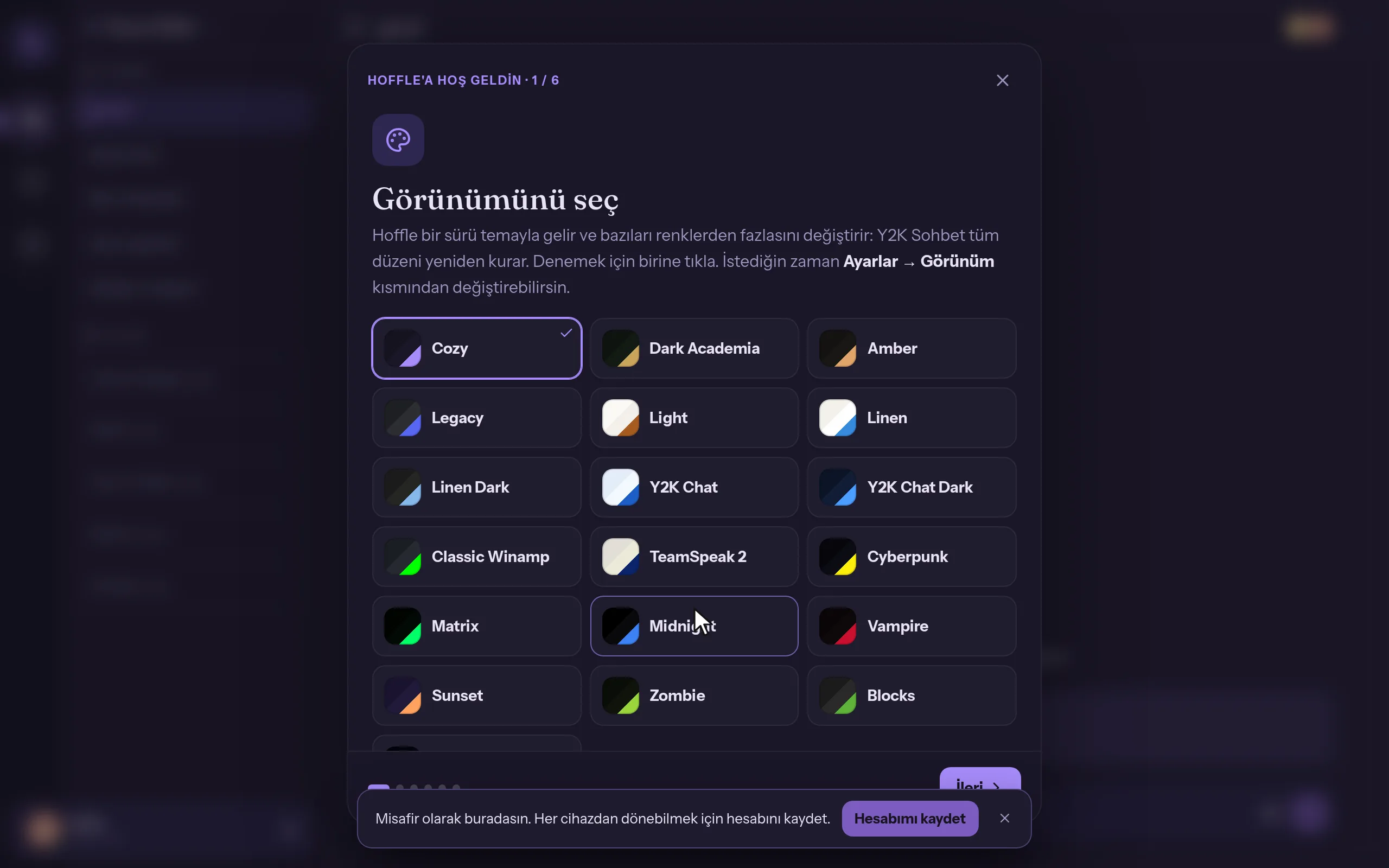
Built-in themes
| Theme | What it looks like |
|---|---|
| Cozy | The default theme: deep purple-tinted dark background, rounded cards. |
| Dark Academia | Old library vibe: forest green leather, aged paper, burgundy, and gold. |
| Amber | Warm amber glow like fireplace light. |
| Legacy | Classic dark charcoal theme. |
| Light, Linen | Light themes; Linen has soft warm-linen tones. Linen Dark is its night version. |
| Y2K Chat, Y2K Chat Dark | 2000s instant messengers: bright blue windows and "says:" message headers. Changes the layout as well as the colors (below). |
| Classic Winamp, TeamSpeak 2 | Themes that dress the whole app up like those classic programs. |
| Cyberpunk, Matrix, Midnight | Neon yellow and cyan; green text and digital rain; pitch-black for OLED screens. |
| Vampire, Sunset, Zombie, Blocks and more | Crimson gothic, sunset gradients, outbreak night, block-world, and other themed looks. |
In the Customize tab you can tweak your chosen theme's colors and details. Create builds a theme from scratch, Import loads a theme someone shared with you, and Community browses themes shared by others. For deeper tweaks, use Custom CSS.
Layout
On the same Appearance page, under Layout above the themes, you can move the channel list to the left, right, top, or bottom; put the member list on the right or left; and move the call controls (voice buttons) to the bottom, top, or sides. The Show row toggles the server banner, activities, and channel topic. Customize layout & widgets… lets you add widgets to the screen.
Y2K Chat theme and MSN features
The Y2K Chat theme turns Hoffle into a 2000s messenger: a window title bar and menu bar, an "Online / Offline" contact list on the right, "… says:" headers on messages, and a classic toolbar above the message box.
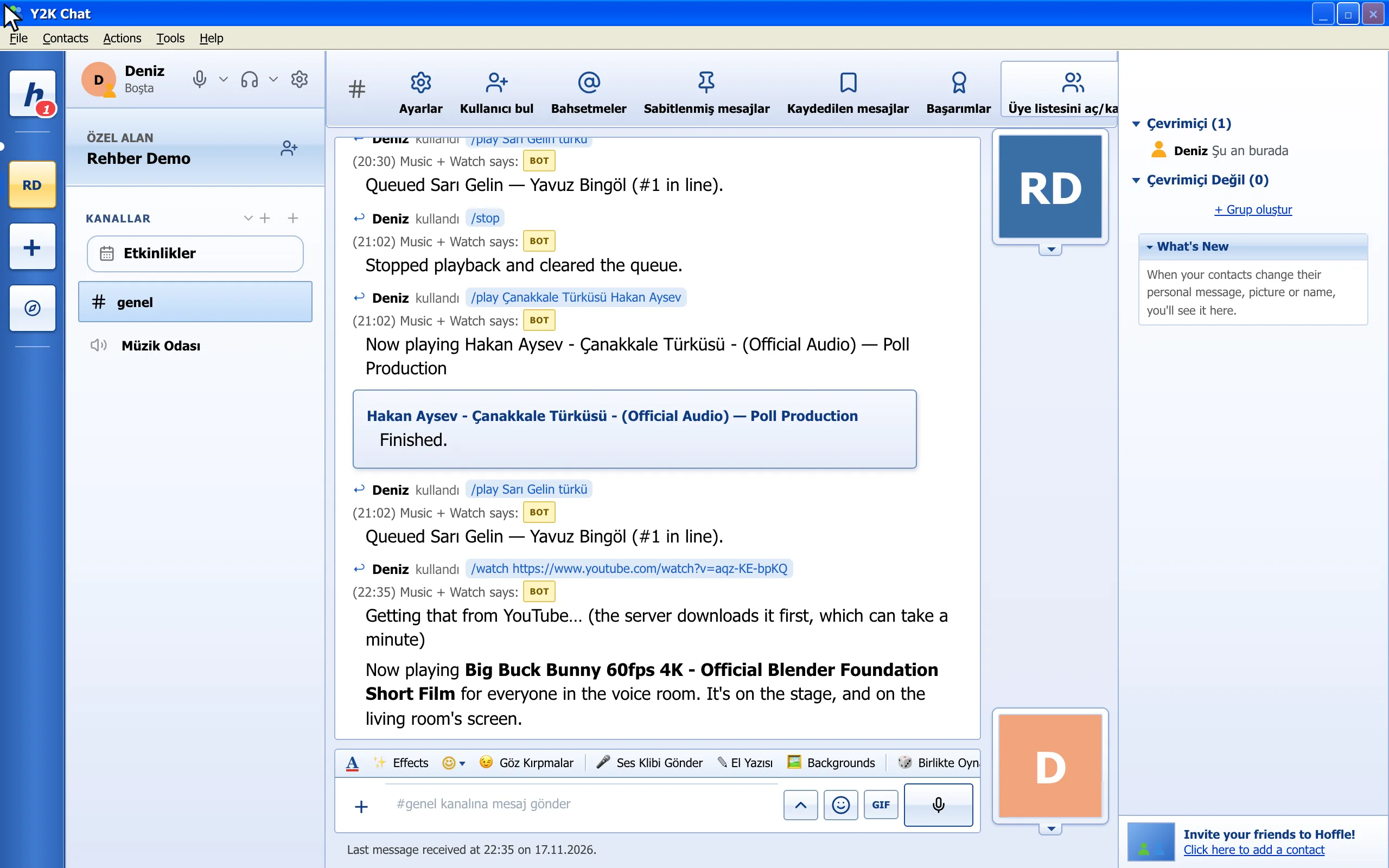
Toolbar buttons:
- Effects: Gives your message colors, fonts, and effects (same as Text Formatting).
- Emoticons (☺): Classic emoticons—for example
(Y)becomes 👍 and(L)becomes ❤️. You can add your own too. - Winks: Sends short full-screen animations that play on everyone's screen. Pick one from the list and it plays for the whole channel. Anyone who missed it can click Play on the wink line in chat to replay it.
- Send Voice Clip: Records and sends a short voice clip.
- Handwriting: Opens a drawing pad; whatever you write or sketch by hand sends as an image.
- Backgrounds: Changes the chat window's background.
- Play Together: Starts a game with people in the channel (Games).
- Send Nudge!: Briefly shakes the window for everyone in the channel to get their attention. There's a short cooldown between nudges so it can't be spammed.
The Y2K Today window opens once a day and summarizes what's happening on Hoffle: who's around, chats waiting for you, upcoming events, what's playing, and a daily tip.
Nudges and winks arrive regardless of which theme you use. If you'd rather not get them, turn off Nudges & Winks under Settings → Appearance → Extras → Features—you can still manually replay a wink from its line in chat. The Retro 2000s sound effects toggle right next to it turns on Y2K-style notification sounds.