Hoffle: a chat app for small groups, with voice, screen sharing and game night built in.
I started Hoffle for my own friend group, who spent most evenings in a Discord call. It has the things we used every night: voice, 1080p screen sharing with sound, a music bot, and D&D tools. It's free and open source, and it works right in your browser.
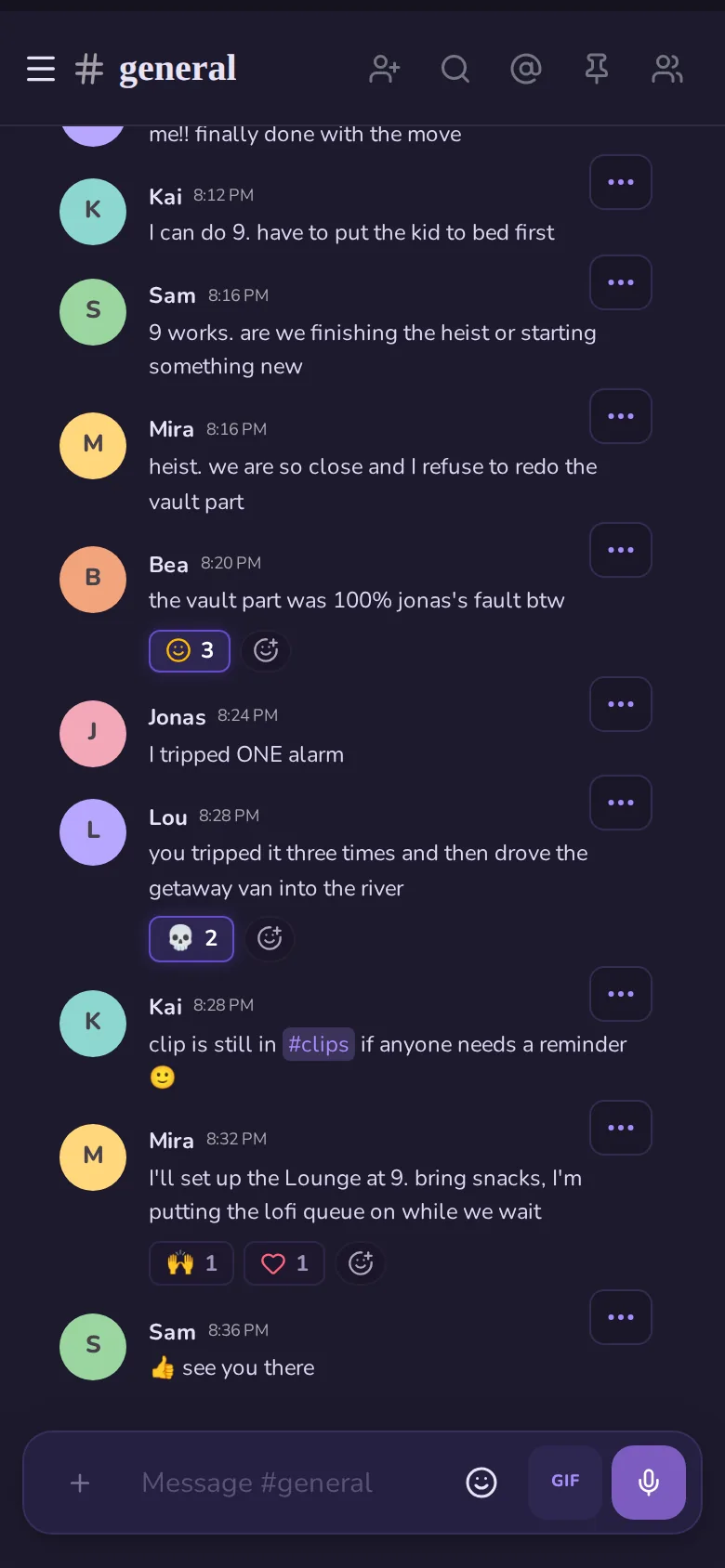
This channel is live. Say hi, ask me something (I read all of it), or try /roll d20. In any theme:
There's also the Hoffle community, where people who use Hoffle hang out, swap themes and find people to play with.
Coming from Discord?
Bring your server with you. Channels, categories, roles and who can see what come across in one go, no bot needed.
Discord vs Hoffle, row by row →- 1
In Discord, open Server Settings → Server Template and copy the link.
- 2
In Hoffle, press + → Create New and paste the link instead of a name.
- 3
Post the ready-made "we're moving" message Hoffle gives you, invite link included.
Features
All of this is in the app today, for everyone.
Voice and screen sharing
- Noise suppression runs on your own device, so fans, keyboards and the TV stay out of the call.
- Screen share up to 1080p at 60 fps with the game or film audio, plus 24 fps film modes that stay smooth.
- Push-to-talk that keeps working while a game has focus (desktop app).
- Spatial audio seating and virtual backgrounds.
Music and watching together
- A music bot with one shared queue, synced so everyone hears the same second of the song. It's its own open-source project and also plays in Discord voice channels.
- A two-deck DJ booth, lyrics, and Watch Together rooms for YouTube and reels.
- A whiteboard, Draw & Guess, tier lists, polls and a soundboard.
D&D
- Battlemaps with tokens and fog of war.
- 3D dice with physics, rolled where everyone can see them.
- A spell and monster compendium inside the call.
Chat
- Threads, replies, reactions, custom emoji and stickers, GIFs and voice messages.
- Link previews, events with RSVPs, and search with filters.
Discord bots
- Hoffle speaks the Discord bot API, so bots written with discord.js or discord.py connect without code changes.
- A bridge mirrors channels you still keep on Discord.
Themes
- 19 built in: Cozy, Dark Academia, Amber, Legacy, Light, Linen, Linen Dark, MSN Messenger, MSN Messenger Dark, Classic Winamp, TeamSpeak 2, Cyberpunk, Matrix, Midnight, Vampire, Sunset, Zombie, Minecraft and Star Wars. Plus themes you write in CSS and share.
- Profile banners, pride badges and a nickname per server.
Theme tour · 1 of 4
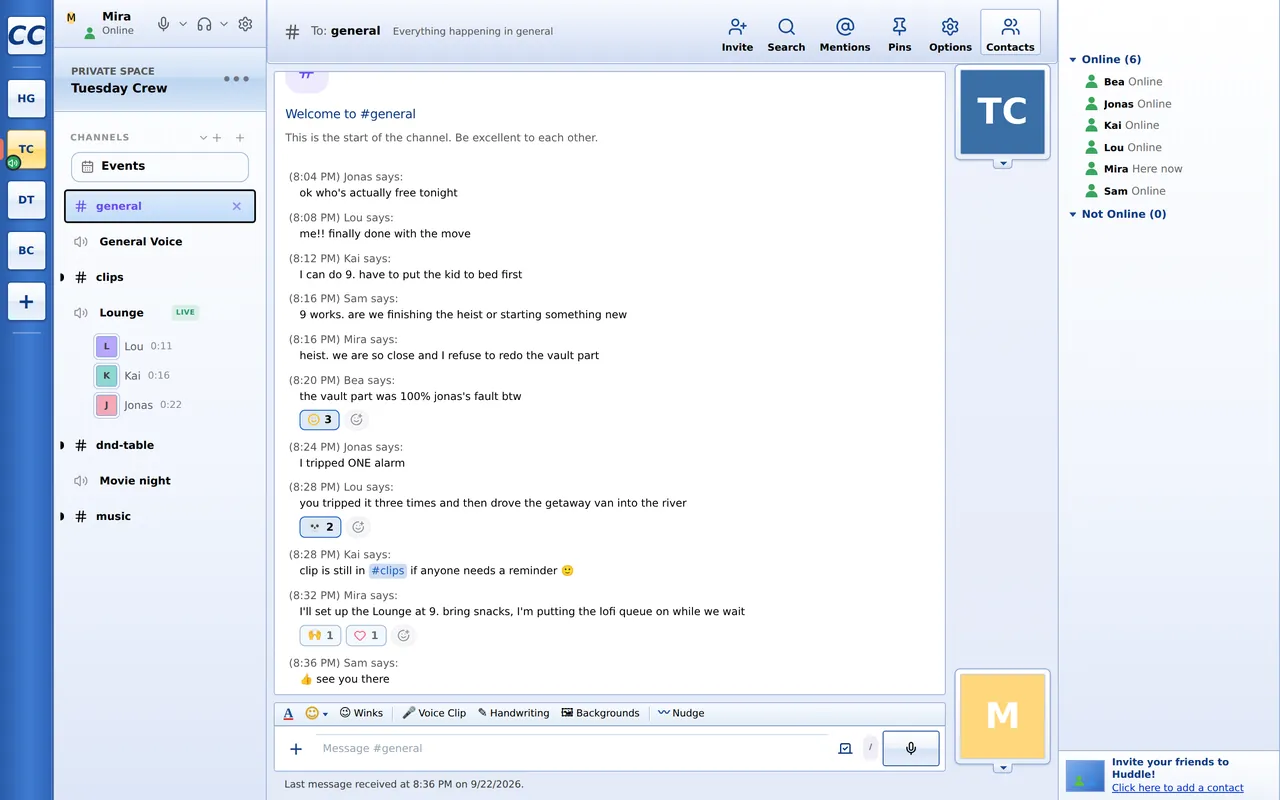
The MSN Messenger theme
A full second interface for Hoffle, modelled on Windows Live Messenger. It changes the layout and behaviour, not only the colours: messages read “Mira says:”, friends signing in show a toast, and a nudge shakes the other person's window.
- A contact list with your own groups, and a quiet list
- Display pictures, personal emoticons, winks and handwriting
- Statuses like Be Right Back and Out to Lunch
- A sound for each event, picked in its Sounds settings
- MSN Today: who's around, unread conversations and what's playing
;)😉(Y)👍<3❤️:$😳
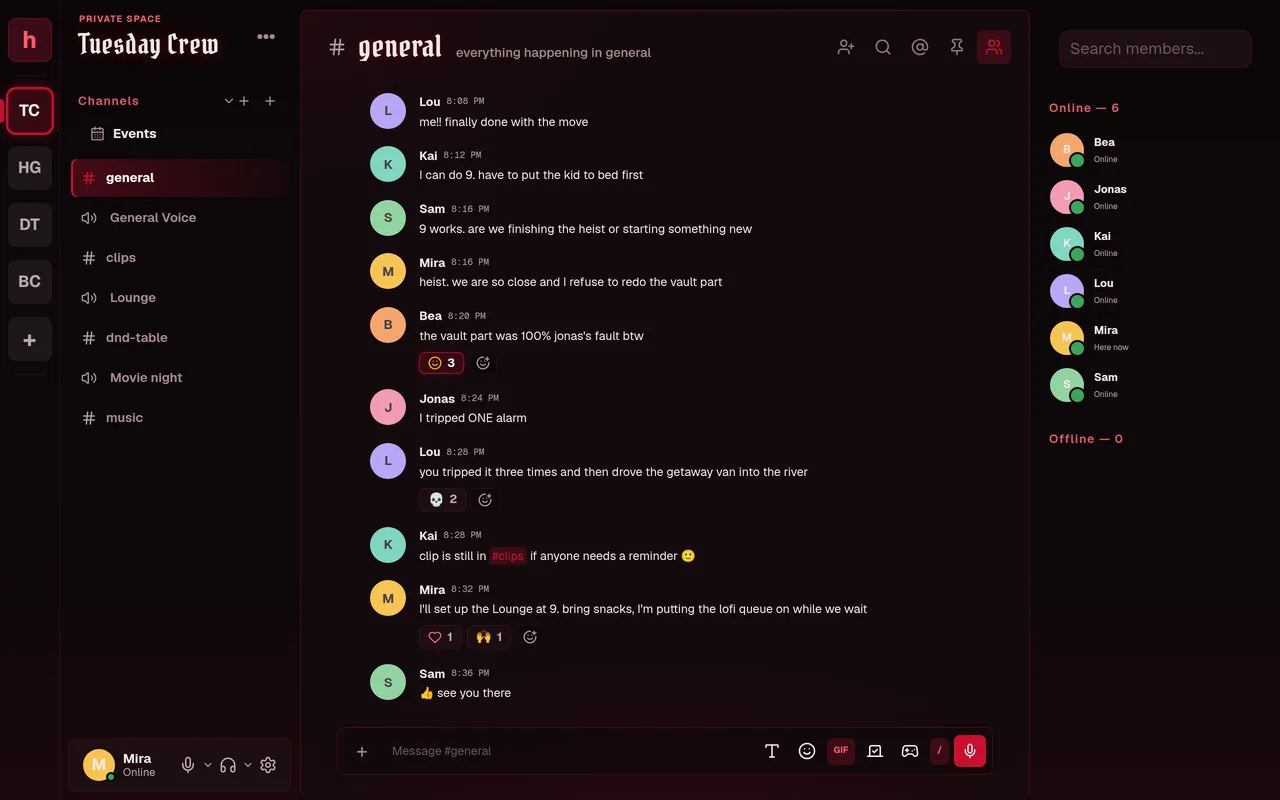
Vampire
Gothic midnight: blood red on black velvet. Channel names and server titles are set in blackletter and glow faintly red.
- Blackletter headings with a red glow
- Velvet gradients down the sidebars and member list
- The message box glows red while you type
- Red text selection, and a matching scrollbar
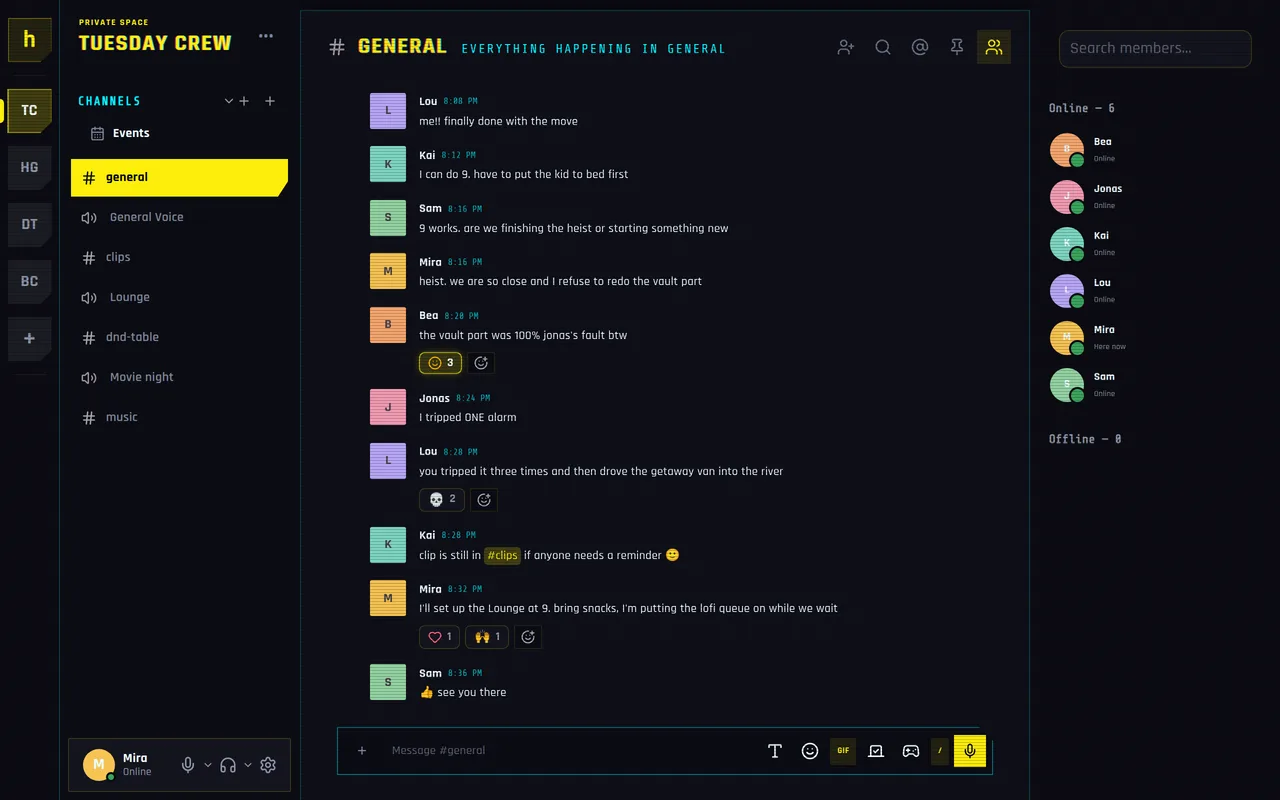
Cyberpunk
A neon street terminal: acid yellow and cyan on black, hard clipped corners, and faint CRT scanlines over everything.
- Headings with a red and cyan chromatic split
- Clipped corners on server icons, channels and the message box
- Monospace cyan labels and timestamps
- Faint CRT scanlines across the whole app
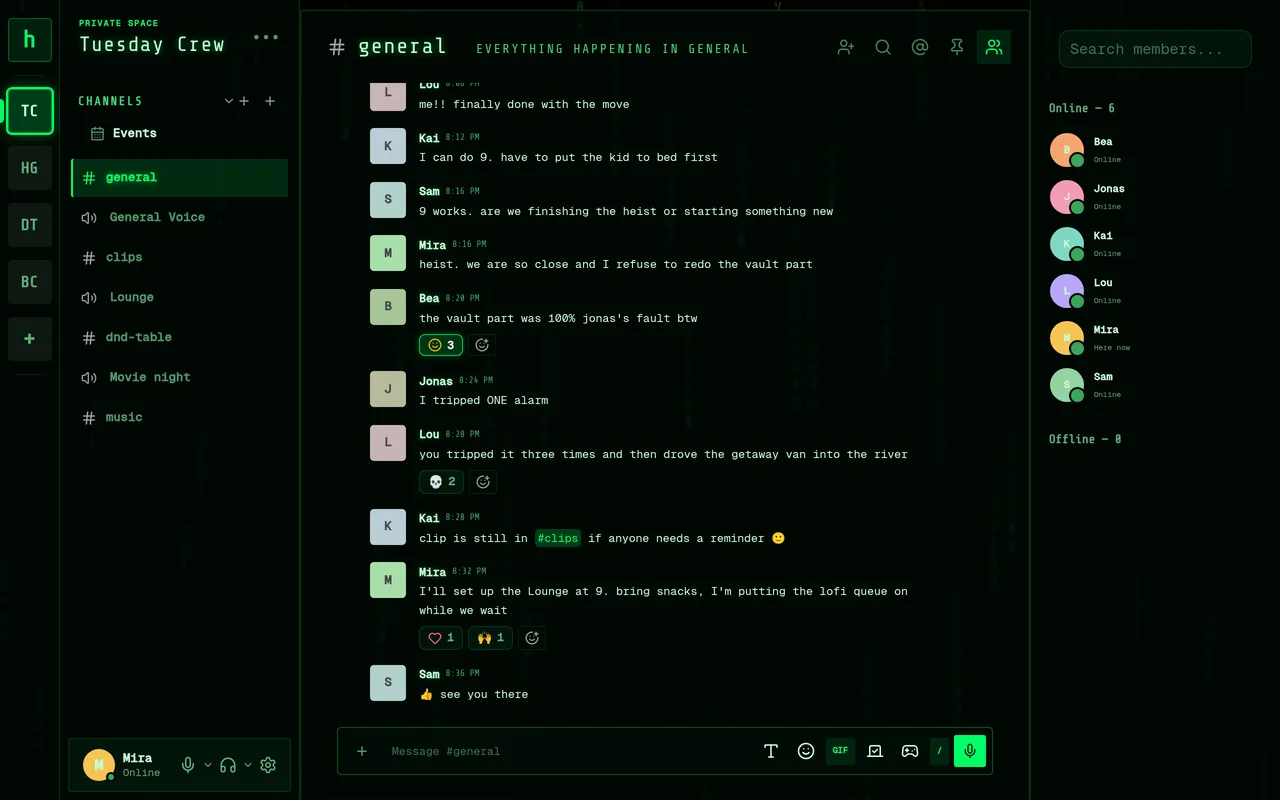
Matrix_
Phosphor green on black, monospace type, and digital rain falling behind slightly see-through panels.
- Digital rain behind the glass, or one still frame if you've asked for reduced motion
- A blinking cursor after the channel name
- The selected channel reads like a terminal's highlighted line
- Monospace everywhere
Hoffle compared to Discord
Discord's free plan next to Hoffle, in numbers. Discord is the better choice for big public communities and has proper phone apps; Hoffle is made for groups of friends.
| Feature | Discord (free) | Hoffle |
|---|---|---|
| Price | Free; Nitro is $9.99 a month (US) | Free, no paid tier |
| Screen share | 720p at 30 fps (1080p60 and up with Nitro) | Up to 1080p at 60 fps, with audio |
| File uploads | 20 MB per file | 8 MB images, 20 MB PDFs, 40 MB video clips |
| Mic quality | 64 kbps default, up to 96 kbps | 64 kbps Opus with packet redundancy |
| Custom emoji in other servers | Nitro only | Free |
| People in one voice room | Up to 99 (25 with video) | No set limit; the server's upload is the limit, about 4 Mbps per 1080p viewer |
| Source code | Closed | Open source, AGPL-3.0 |
| Host it yourself | No | Yes, with Docker |
| Bots | Yes | discord.js and discord.py bots connect unchanged |
| Phone | iOS and Android apps | Phone browser, added to the home screen, with notifications |
Discord figures are from discord.com/nitro and Discord's help centre, October 2026. Hoffle's upload limits are those of chat.hoffle.online.
Download Hoffle
You don't need to install anything: Hoffle works in Chrome, Edge, Firefox and Safari. If you'd like it in your taskbar or dock, there are two ways.
Install it from your browser
Open Hoffle in Chrome or Edge and click Install. In Safari on a Mac: File → Add to Dock. On a phone: Share → Add to Home Screen. No installer, nothing to approve, and it keeps itself up to date.
Install HoffleOr get the desktop app
It adds push-to-talk that works while a game has focus, and your computer's sound when you share your screen.
- Windows.exe installer, 110 MBDownload →
- Mac (Apple chip).dmg, M1 and newer, 122 MBDownload →
- Mac (Intel).dmg, older Macs, 128 MBDownload →
- Linux.AppImage, Wayland and X11, 120 MBDownload →
- Hoffle Litea much smaller app for Windows and MacWindows →Mac →
- Hoffle Nativebeta: the lightest one, under 1 MB, for Windows, Mac (Apple chip) and Linux (no voice calls on Linux yet)Windows →Mac →Linux →
Version 2.1.1, downloaded straight from hoffle.online.
Windows: the first time, a blue “Windows protected your PC” box may show up, because the app isn't code-signed yet (that's being sorted). Click More info, then Run anyway. Or install from the browser above, which never asks.
Mac: if it says the app can't be opened, go to System Settings → Privacy & Security, scroll down and click Open Anyway.
On your phone
Open chat.hoffle.online and add it to your home screen. Notifications work too: allow them when Hoffle asks (on an iPhone, add it to the home screen first). Rather keep Google and Apple out of it? Hoffle can send them through the free ntfy app instead.
Is this going to stick around?
Fair question before you move your group over. Hoffle is one person's project, so here's how it's run and what happens when something breaks.
Live status and uptime- Backed up every five minutes
- Every message and upload is copied to a second server in Germany every five minutes, and to a separate disk every night.
- A backup server takes over by itself
- Hoffle runs on a server at my place. If it stops answering, the one in Germany takes over on its own, usually within three minutes, and hands everything back when the main one is up again.
- Your stuff is yours
- Settings → Password & Security → Download my data gives you everything you've posted, as one file, whenever you like.
- Nobody can lock it up
- The code is open source (AGPL), so not even I can close it off. If chat.hoffle.online ever went away, your group could carry on with its own Hoffle on any PC.
- No surprise shutdown
- If I ever close chat.hoffle.online, you'll hear it at least three months ahead, in the app and by email, and data downloads stay open until the last day.
- Cheap to keep running
- It runs on a home server and a free cloud machine, so it doesn't need your money to stay up. Ko-fi tips go to hardware and code-signing.
How voice works
Since October 2026, calls on chat.hoffle.online run through LiveKit, an open-source media server. Before that, every call was peer-to-peer, which got heavy past about 8 people or when several people watched one screen share. Self-hosted servers can turn it on with a Docker profile and three settings.
- Everyone uploads once
- You send your mic and screen to the server once and it forwards them, so a room isn't capped at the 6 to 8 people a peer-to-peer call can carry.
- A slow connection only affects itself
- Screen shares are sent in two sizes. A viewer on a weak connection gets the smaller one, and the sharer and everyone else keep the full picture.
- Modes for films and for desktops
- Film modes run at 24 fps and give up resolution before frames, so movies don't stutter. Desktop modes keep text sharp and give up frames first.
- Fewer dropouts
- Mic audio is sent with spare packets, so a lost one is rebuilt instead of heard as a gap. If the media server can't be reached, the call falls back to peer-to-peer.
Run your own Hoffle
Hoffle runs on a spare PC, a home server or a small VPS with Docker. The first account you create becomes the owner. Accounts, messages and uploads all live in one state folder, so a backup is a copy of that folder.
- No configuration needed for a first run
- LiveKit for bigger voice rooms:
--profile livekit - The full music bot:
--profile musicbot - A TURN relay for friends on strict networks:
--profile turn - The desktop app can point at your server from its menu
$ git clone https://github.com/Coxaexs/huddle.git hoffle$ cd hoffle$ docker compose up -d# then open http://localhost:8730 and make your account
Questions
Is it free?
Yes. There's no paid tier and nothing is locked. The code is AGPL-3.0, so it stays open.
How do I get in?
Anyone can make a free account on chat.hoffle.online: open it, pick a name and a password, and you're in. If a friend sent you an invite link, open that instead and you'll land in their server.
Do my friends have to install anything?
No, it works in the browser. The desktop app adds push-to-talk that works in games, a screen-share picker with your computer's sound, and taskbar or dock notifications.
How many people fit in a voice call?
On chat.hoffle.online calls go through LiveKit, so there's no fixed limit; the server's upload speed is what runs out first. A self-hosted server without LiveKit uses peer-to-peer calls, which work well up to about 8 people.
Is there a phone app?
Not in the stores yet. Open chat.hoffle.online on your phone and add it to your home screen; it then works like an app, notifications included.
Who can read my messages?
Like with most chat apps, whoever runs the server can. On chat.hoffle.online that's me, Abdullah. I don't go through people's chats, there are no ads or trackers, and nothing gets sold. If you'd rather it be you, host your own.
What if Hoffle shuts down?
You'd get at least three months' notice, you can download your data at any time, and because the code is open your group can keep going on its own server. There's more about this under “Is this going to stick around?” above.
What does the MSN Messenger theme change?
The whole layout, not only the colours: a contact list with groups, “says:” before each message, display pictures, personal emoticons, nudges, winks, handwriting, chat backgrounds, sign-in toasts with their own sounds, and an MSN Today window. Pick it in Settings → Appearance.
Hoffle is made by me, Abdullah, in the Netherlands. Most of the ideas in it came from the friends who use it. Bug reports and pull requests are welcome on GitHub, or just say hi in #say-hi up top.